00

Duration
Skills
Collaborator
Outcome
Confidentiality Note
This case study has been adapted for portfolio purposes. Product names, customer information, proprietary interfaces, internal metrics, and implementation details have been omitted or modified. The underlying design process and my contribution remain representative of the project.
01
Project Overview
REST API Example Creator is a user assistance tool that scans a REST API guide, identifies endpoints lacking examples, and helps user assistance writers generate XML examples for review before publishing. It addresses a recurring, high-effort workflow in which writers manually locate gaps, interpret specifications, create and test payloads, follow file-naming standards, and guard against sensitive or environment-specific data.
The Gap
REST APIs can have hundreds or thousands of endpoints, but creating documentation examples for each one is a surprisingly manual process.
For an API writer, finding a missing example is only the beginning. They have to identify the endpoint, understand its behavior from technical specifications, construct the request and response payload, create and format the XML file, test the example against an environment, and make sure the final file follows documentation and confidentiality requirements. As the number of APIs grows, this process becomes difficult to scale.
Challenge
How do we help writers find missing examples faster and reduce the repetitive work of creating them, without taking away the technical review and validation they need before publishing?
02
Personas
Primary Persona - The API documentation writer
REST API Example Creator is a user assistance tool that scans a REST API guide, identifies endpoints lacking examples, and helps user assistance writers generate XML examples for review before publishing. It addresses a recurring, high-effort workflow in which writers manually locate gaps, interpret specifications, create and test payloads, follow file-naming standards, and guard against sensitive or environment-specific data.

Secondary Persona - The Product Manager

How the Personas work together?
The two personas interact with documentation at different points in the product lifecycle. Arjun receives technical information from developers and uses it to create an initial documentation draft. Priya then takes that draft further reviewing the API behaviour, filling gaps, creating examples, testing them, and preparing the content for publication.
Key User Needs
01 - Finding the gap is work in itself
With large API surfaces, writers need a way to quickly understand what is missing instead of manually inspecting every endpoint.
02 - A draft isn't the same as publish-ready content
The product needs to distinguish between generated content and validated content. Writers still need to test and review examples before publication.
03 - Scale changes the interaction
When you're dealing with hundreds or thousands of endpoints, the problem isn't just creating one example faster. It's helping users find, prioritise, select, and manage many examples at once.
03
The Challenge
The existing workflow relies on several manual steps between receiving API information and publishing a complete example. Product managers may start with developer-provided information, but writers still need to identify gaps, interpret technical details, create examples, and validate them before publication. As the number of endpoints grows, this repetitive process becomes increasingly difficult to manage
Discover the gap
Help users quickly understand which endpoints are missing examples.
Reduce repetitive work
Automate the tedious parts of identifying and creating examples.
Keep the process transparent
Make it clear what was scanned, selected, generated, skipped, or excluded.
Keep humans in control
Generated content should remain a draft until a writer has reviewed and validated it.
04
To understand where the product could reduce effort, I mapped the workflow from the perspective of the API documentation writer. The journey focuses on the repeated work involved in finding missing examples, creating them, and getting them ready for publication.

05
With the writer journey mapped, I translated the workflow into a product structure. The goal was to keep the experience simple despite the technical complexity happening underneath.

06
A series of focused features that support the writer from finding documentation gaps to reviewing generated examples. Each feature addresses a specific part of the user's workflow while keeping the overall experience connected.
Prototype - AI based Example Generation
We explored whether the core example-generation workflow could be handled through a GPT-based prototype. The goal was to understand what could be automated from an existing API documentation page and where the workflow would still require human intervention.
01 - Providing the documentation link
The GPT used the endpoint documentation as the starting point for understanding the API and generating an example.


02 - Generating the cURL command
This established that the GPT could translate information from the API documentation into a usable request example.
03 - Example request and response
This was useful for validating the core generation capability: the GPT could interpret the endpoint and produce the technical components needed for an API example.

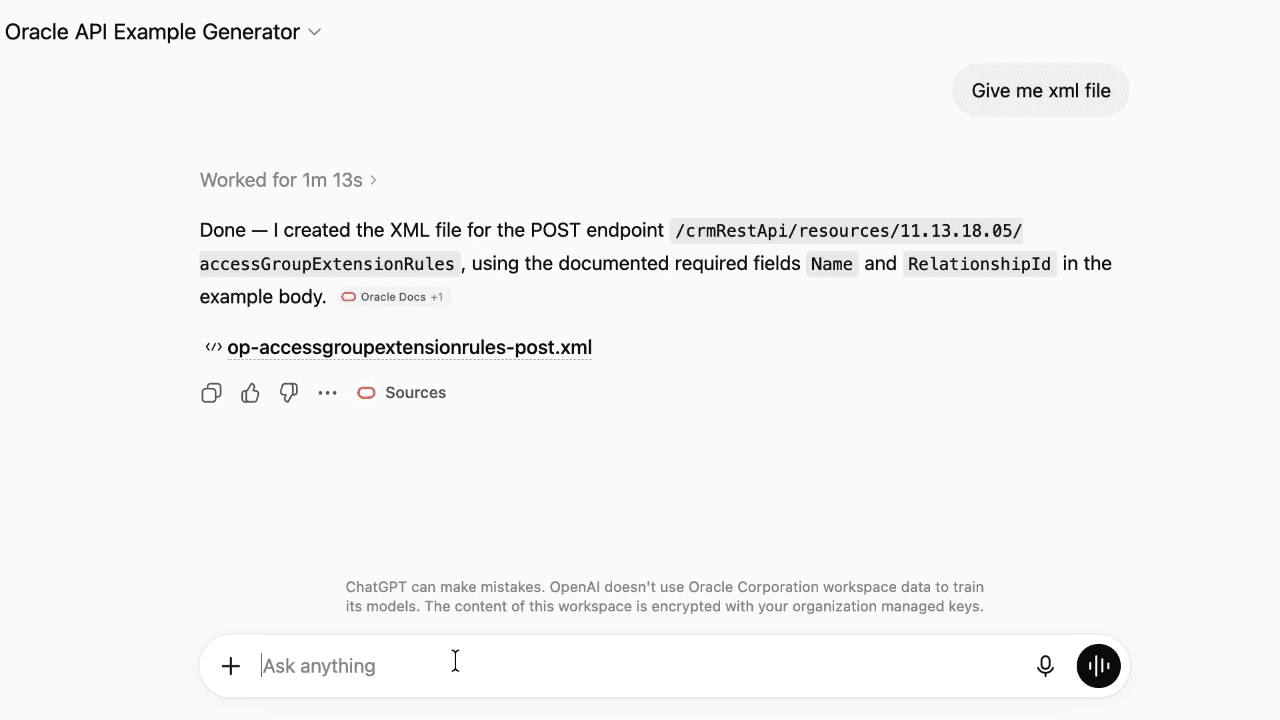
04 - Generating the XML File
The GPT also prompted for whether an XML data file was required. When asked to create one, it was able to generate the XML file for the endpoint.
What the prototype revealed
While the GPT could generate the individual components, it exposed two important gaps in the workflow.
Finding missing examples was still manual
The GPT could generate an example when given an endpoint, but it had no reliable way to determine which endpoints across a documentation set were missing examples.
File naming was difficult to automate reliably
Generating the XML content was possible, but determining the correct filename consistently required additional context and manual checking.
How do we systematically find missing examples across an API documentation set and turn them into consistent, reviewable files?
07
With the GPT prototype validating that individual API examples could be generated, the next challenge was to design a complete workflow around the writer's actual job.
Instead of starting with example generation, I designed the experience around the larger task: Find what's missing → decide what to work on → generate → review → validate
The interface was therefore broken into a set of focused features, each addressing a specific point in the documentation workflow. The following section walks through these features one by one, showing the interaction, the design decisions behind it, and how each contributes to the overall experience.
01 - Scanning for missing examples
Start with a documentation URL and identify the API surface that needs to be evaluated. Give the writer a quick overview of what was scanned, what is missing, and whether there were exceptions.
02 - List the endpoints missing examples
Turn the scan into a manageable list of endpoints that need documentation examples. Save the findings as a .csv to work on them locally, introduce filters to ensure that the API writers can find the endpoints easily
03 - Saved Searches
Allow frequently used searches and filter combinations to be saved and revisited.
04 - Select and Generate
Give writers control over which examples are generated and allow them to generate them in batches.
05 - Review Generated Examples
Bring the generated XML and documentation preview together so writers can review the output before it moves toward publication.
06 - Integration with existing workflow
Generated xml files compliant with the default file naming systems, integrated seamlessly with the Oxygen authoring tool
08
The REST API Example Creator evolved from a simple GPT experiment into a structured workflow for identifying, generating, and reviewing missing API examples. The early prototype showed that GPT could generate cURL commands, request and response bodies, and XML files from an endpoint, but it also exposed the limitations of generation alone, there was no reliable way to find missing examples across a documentation set, and file naming and consistency remained difficult. This led to designing a more complete experience around scanning, filtering, selecting, generating, and reviewing examples at scale.
The final experience reduces repetitive work while keeping writers in control of what gets generated, reviewed, validated, and eventually published. Designing for a technically complex workflow also pushed me to think beyond individual screens and consider system states, bulk actions, exceptions, and user confidence as core parts of the UX.